There is a version of SAP monitoring that exists mostly as a compliance exercise: a tool is installed, thresholds are set to defaults, and a dashboard sits open on a screen that nobody watches. Alerts fire when something is already broken. Post-incident reviews start by admitting that the warning signs were there they just were not visible to the right people at the right time.
Modern SAP monitoring platforms are built around a different premise. Real-time visibility in an SAP environment is not about having more data. It is about having the right signals, correlated across system layers, surfaced at the moment they are actionable.
This article covers what that looks like in practice: what SAP teams should actually measure, which KPIs translate technical health into business meaning, how alerting patterns can stop generating noise and start generating value, and what best practices separate operational teams that catch problems early from those that respond to them after the fact.
What SAP monitoring real-time visibility actually means in enterprise landscapes
Beyond system availability measuring what business operations depend on
System availability is the most basic SAP monitoring metric and also the least informative one in isolation. A system that is technically up but running with saturated work processes, degraded HANA memory, and backed-up update tasks is not available in any operational sense. Users are experiencing slow transactions, background jobs are queuing, and data writes are delayed even though the availability dashboard shows green.
Real-time visibility means measuring the components that business operations actually depend on, not just the ones that are easiest to instrument. That includes dialog response times for interactive users, background job completion windows for reporting and batch processing, interface throughput for cross-system data flows, and database performance for the queries and writes that every transaction triggers. Availability is a necessary condition for healthy SAP operations it is not a sufficient one.
The gap between technical metrics and business impact
One of the persistent challenges in SAP monitoring is the translation gap between what monitoring tools measure and what business stakeholders care about. An SAP Basis engineer understands what a work process bottleneck means. A finance director running month-end close does not but they will feel the consequences within minutes.
Modern SAP monitoring platforms close this gap by mapping technical metrics to business process health. Instead of showing raw HANA memory consumption, they surface whether the procure-to-pay process is running within SLA. Instead of reporting on update task queue depth in isolation, they flag that posted invoices are not reaching the database within the expected window. This translation layer makes monitoring data relevant to more stakeholders and makes it possible to communicate system health in terms that drive business decisions, not just operational responses.
Real-Time versus near-real-time why the distinction matters
Not all monitoring platforms deliver the same data freshness, and the difference between real-time and near-real-time coverage matters in SAP environments where conditions can change rapidly. A memory leak in a HANA system can accelerate from a performance warning to an out-of-memory event in under ten minutes. A work process queue that is building slowly during a peak load period can reach saturation and block new sessions before a 5-minute polling cycle catches it.
Real-time monitoring collects and surfaces metrics continuously, enabling detection and response within the window where intervention is still preventive rather than reactive. Near-real-time polling at multi-minute intervals is often sufficient for trend analysis and capacity planning but insufficient for incident prevention. SAP teams should know which category their monitoring platform falls into for each metric they rely on, because the operational response playbook needs to match the data freshness.
What SAP teams should measure layers of monitoring coverage
Infrastructure and database layer : the foundation
Monitoring starts at the infrastructure layer because everything above it depends on it. For SAP environments, this means tracking compute resources (CPU, memory) at the server level, storage I/O latency and throughput, and network latency between application and database tiers. For SAP HANA specifically, the database layer has its own set of critical metrics that go beyond generic database monitoring.
HANA memory management is the most important area. SAP HANA is an in-memory database, which means that as data volumes grow, memory pressure increases and if available memory is exhausted, the system stops. Monitoring HANA memory usage against available capacity, tracking the growth trend over time, and alerting well before the critical threshold is reached is one of the highest-value monitoring activities in any S/4HANA environment.
HANA log volume is equally important and frequently undermonitored. The HANA log volume stores all uncommitted transaction data. If it fills completely, the database performs an emergency stop with no warning to users and no graceful shutdown. A single monitoring alert set at 70% log volume utilization can prevent a category of outage that looks, from the outside, completely unexpected.
Application Layer : where user experience is determined
The SAP application layer is where user-visible performance lives. Dialog response time the time from when a user submits a transaction to when they receive a response is the most direct indicator of whether the system is delivering an acceptable experience. It is also a composite metric: degradation in dialog response time can originate from work process saturation, slow database queries, memory pressure, or network latency between layers.
Work process monitoring is the second critical application-layer metric area. SAP systems have a fixed pool of work processes for different task types dialog, background, update, spool, enqueue. When the demand for a given type exceeds the available pool, requests queue. Sustained saturation of the dialog work process pool is one of the most common causes of user-visible slowdowns, and it is entirely preventable with continuous monitoring and appropriate alerting thresholds.
ABAP short dumps deserve specific attention. Every short dump in a production system represents a transaction that failed a user who received an error, a batch job that terminated, a process that did not complete. Short dump rate should be zero in a well-maintained production environment. Even a low but persistent rate signals instability that will worsen under load.
Integration and interface layer : the silent failure zone
Interface monitoring is the area where SAP environments most consistently have blind spots. Point-to-point integrations between SAP and external systems via IDocs, RFC, REST APIs, or middleware queues carry business-critical data that, when it fails to flow correctly, creates downstream consequences that are often discovered hours or days after the initial failure.
The key metrics here are error rates per interface, queue depths for asynchronous message processing, retry counts (which indicate repeated failures rather than isolated ones), and end-to-end message latency from sender to confirmed receipt. An interface that is technically active but processing with a 40% error rate is worse than one that is clearly down because the partial operation masks the failure and allows corrupted or incomplete data to accumulate in downstream systems.
Integration monitoring also needs to cover connection health proactively. SSL certificate expiry, RFC destination availability, and API endpoint response times are the kind of low-level signals that are easy to instrument and easy to ignore until an expired certificate takes down a production integration at the worst possible moment.
Business process layer : connecting technical health to operational outcomes
The outermost monitoring layer connects technical metrics to the business processes that run on top of them. This is where monitoring stops being purely an IT function and becomes a shared responsibility between IT operations and business stakeholders.
Business process monitoring tracks whether scheduled batch jobs completed within their defined windows, whether critical reports are delivered on time, whether financial postings are processing within expected latency, and whether procurement or logistics workflows are progressing through their steps without getting stuck. These metrics are meaningful to business owners in a way that HANA memory statistics are not and they create accountability for SAP teams to maintain service levels that go beyond raw availability.
Establishing these process-level metrics requires collaboration between SAP Basis teams and the business units they support. The conversation about what constitutes acceptable end-to-end performance for a given process is worth having before go-live not during an incident.
Key SAP monitoring KPIs : a reference for enterprise teams
The table below covers the core KPIs that SAP monitoring platforms should track in production environments, along with indicative targets and the operational reason each metric matters. These values are reference points the correct threshold for any given environment depends on the specific workload profile, user base, and SLA commitments in place.
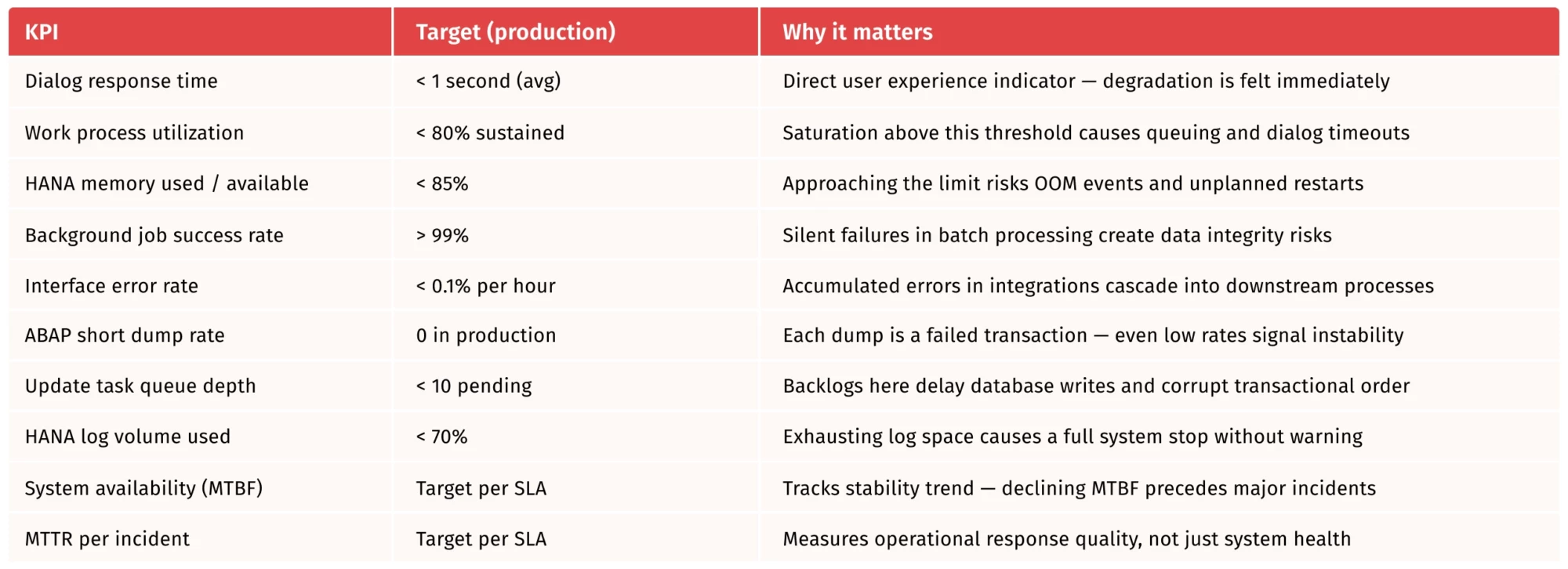
Two points on how to use this table: first, no KPI should be evaluated in isolation.
Dialog response time degradation combined with high work process utilization and elevated HANA query times tells a coherent story each metric alone would be ambiguous. Second, the targets above apply to production systems. Development, QA, and sandbox environments have different profiles and should be monitored with separate thresholds, not the same alerts scaled down.
Alerting patterns that generate value instead of noise
Why most SAP alert configurations fail over time ?
Alert fatigue is one of the most predictable failures in SAP operations. It typically follows a consistent pattern: a monitoring platform is deployed with factory-default thresholds, the first weeks generate a flood of low-priority alerts that are not actionable, the team begins muting or ignoring categories of alerts, and within a few months the monitoring layer is effectively decorative still running, but no longer influencing operational behavior.
The root cause is almost always misconfigured thresholds rather than a fundamental problem with the monitoring approach. Default thresholds are generic; they have no relationship to the actual workload profile of the environment they are applied to. An alert at 80% CPU that fires ten times per day during normal operation trains the team to ignore it — and will be ignored on the day it fires because of a genuine problem.
Baseline-driven alerting : setting thresholds that mean something
The alternative to default thresholds is baseline-driven alerting: measuring what normal looks like for a given system over a representative period, and setting alert thresholds relative to that baseline rather than relative to arbitrary percentages.
This requires a measurement phase before alerts are tuned. For a new SAP system or a newly monitored one, two to four weeks of data collection under normal operating conditions covering different days of the week, month-end periods, and batch job cycles provides enough baseline to distinguish genuine anomalies from expected variability. Thresholds set above the observed normal range will fire only when behavior deviates from what the system actually does, not when it does what it always does.
Baseline-driven alerting also enables time-aware thresholds. A work process utilization threshold that fires at 75% during business hours might be set at 90% during overnight batch windows, where sustained high utilization is expected and acceptable. Static thresholds applied uniformly across 24 hours will either miss daytime issues or generate noise at night time-aware configuration avoids both.
Alert severity tiers and routing : getting the right signal to the right person
Not all alerts warrant the same response, and routing every alert to the same team with the same urgency is a reliable way to ensure that critical alerts receive delayed attention. A structured severity tier model distributes alerts by urgency and routes them to the appropriate responders.
A practical three-tier model for SAP environments works as follows. Critical alerts production system down, HANA out-of-memory imminent, zero dialog work processes available require immediate human response and should trigger on-call escalation regardless of time of day. Warning alerts response time degradation trending upward, interface error rate above threshold, memory at 80% and rising should be reviewed within a defined window (typically within the hour during business hours) and may be auto-resolved if the condition normalizes. Informational alerts job completion confirmations, daily health check summaries, capacity trend reports should be available for review but should not interrupt operations.
ITSM integration adds another dimension to alert routing. SAP monitoring platforms that integrate with ServiceNow, Jira Service Management, or similar tools can automatically create and classify incidents with SAP-specific context attached system name, error category, affected process, relevant log excerpts. This eliminates the manual translation step between a monitoring alert and an actionable incident ticket, and ensures that the context needed for diagnosis travels with the alert from the moment it is raised.
Suppression, correlation, and reducing the maintenance burden
Two alerting features that significantly reduce operational noise are suppression and correlation. Suppression allows alerts to be silenced automatically during planned maintenance windows, migration activities, or known temporary conditions without requiring manual alert management from the operations team. A system that generates 300 alerts during a planned upgrade window and routes them all to the on-call engineer is a system whose monitoring configuration needs attention.
Correlation groups related alerts into a single incident rather than creating one ticket per symptom. When a HANA memory pressure event triggers dialog response time degradation, which triggers work process queue buildup, which triggers user session timeouts these four symptoms are one incident, not four. A monitoring platform that correlates them correctly reduces triage time and helps the operations team understand the causal chain rather than managing an artificially inflated alert queue.
Best practices for SAP monitoring real-time visibility at scale
Adopt agentless monitoring to reduce deployment complexity
Agent-based monitoring in SAP environments introduces ongoing maintenance overhead that compounds as the landscape grows. Each agent requires deployment, version management, compatibility testing with SAP patch levels, and periodic recertification. In landscapes with dozens of systems across multiple environments, this overhead is non-trivial and agent failures or incompatibilities can create monitoring gaps at precisely the moments when coverage is most needed.
Agentless monitoring approaches that connect to SAP systems via standard APIs and RFC connections deliver equivalent coverage without the deployment footprint. The initial setup requires only a dedicated monitoring user with appropriate authorizations no transport requests, no software installation on production systems, no change management overhead for each monitoring update. For MSPs and large SAP CoEs managing multiple landscapes, the operational difference is substantial.
Build monitoring coverage before migration, not after
SAP S/4HANA migration projects have a consistent blind spot: monitoring is treated as a post-go-live activity rather than a pre-migration requirement. The consequence is that the migration window the highest-risk operational period in the project passes with minimal visibility into system health, data migration quality, and performance baseline.
Instrumenting the legacy system before the migration starts establishes the baseline that makes the post-migration comparison meaningful. If dialog response times in the S/4HANA system differ significantly from the ECC baseline under comparable load, the monitoring data will show it and the project team will have the evidence needed to investigate and resolve it before go-live, not after. Post-migration reporting built on pre-migration baselines is also a concrete deliverable that demonstrates monitoring value to both the business and the project sponsors.
Consolidate monitoring across landscapes into a single view
Fragmented monitoring one tool for HANA, another for NetWeaver, a third for interfaces, a separate dashboard for business processes creates operational overhead and cognitive friction that slows incident response. When an alert fires, the first question should not be “which tool do I open?”
A consolidated monitoring view that covers all SAP components across all client environments in a single interface reduces context switching, makes cross-system correlation possible, and gives management a single source of truth for landscape health. For MSPs managing multiple clients, a centralized view is the difference between scalable operations and a per-client monitoring burden that grows linearly with the portfolio.
Review and tune monitoring configuration regularly
SAP landscapes are not static. Workload patterns change with business growth, new integrations add interface dependencies, S/4HANA upgrades change performance profiles, and RISE migrations shift infrastructure ownership. Monitoring configurations that were accurate at go-live will drift out of alignment with the actual environment over time.
A quarterly monitoring review covering threshold relevance, alert volume by category, false positive rate, and coverage gaps for new systems or interfaces keeps the monitoring layer calibrated to the environment it is meant to protect. The review does not need to be lengthy. An hour per quarter spent adjusting thresholds and reviewing alert trends is enough to prevent the gradual degradation into alert fatigue that affects most long-running monitoring configurations.
Real-Time visibility is what separates reactive SAP operations from reliable ones
The difference between an SAP team that catches problems before users feel them and one that responds to incident reports is almost always a monitoring question. Not the presence or absence of a monitoring tool most SAP environments have one but whether that tool is configured to surface the right signals, at the right time, to the right people.
That requires intentional decisions at every layer: measuring beyond availability to cover the application, database, integration, and business process layers; setting KPI thresholds against actual baselines rather than defaults; designing alerting tiers that route the right urgency to the right responders; and maintaining the monitoring configuration as the landscape evolves.
Modern SAP monitoring platforms make these practices achievable without the overhead that made them difficult in previous generations of tooling. The investment is in configuration, calibration, and discipline not in infrastructure complexity. For SAP teams running enterprise-scale landscapes, that investment pays back every time a production incident is prevented rather than responded to.
See how Redpeaks delivers real-time SAP monitoring visibility across enterprise and hybrid landscapes.