A background job finishing with status FINISHED does not mean it did what it was supposed to do. That is probably the most important thing to understand before setting up any monitoring on SAP batch processing, a distinction most alerting configurations get wrong.
Background jobs in SAP carry a disproportionate amount of business risk relative to the attention they receive. Payroll calculations, financial period-end closings, material requirement planning runs, invoice matching, dunning. These processes run silently in the background, often overnight, and the first sign of a problem is frequently a business user asking why their report shows last week’s data or why a payment run did not execute.
This article focuses on the practical side of SAP background job monitoring: what actually needs to be tracked (beyond status codes), how to structure alerting without drowning in noise, and where most monitoring setups have blind spots that are easy to fix once you know where to look.
Why SAP background jobs are a monitoring problem of their own ?
SAP background jobs sit in an awkward position from a monitoring standpoint. They are not interactive transactions, so users do not feel their degradation directly, at least not immediately. They run on a fixed schedule, which makes them easy to overlook in real-time dashboards oriented toward dialog performance. And they are often treated as a solved problem because SM37 exists.
SM37 is a job log, not a monitoring tool. It tells you what happened after the fact. It does not tell you that a job is currently running 45 minutes past its expected duration, that a predecessor job failed and silently blocked three downstream processes, or that the background work process pool is saturated because two concurrent MRP runs were scheduled at the same time by different departments.
The silent failure problem
Background jobs fail in two distinct ways, and only one of them is obvious.
The obvious failure is a job that terminates with status ABORTED or CANCELLED. These show up in SM37, generate system messages, and with even basic monitoring in place, will usually be caught relatively quickly.
The less obvious failure is a job that completes with status FINISHED but did not actually do its job correctly. This happens when the ABAP program itself catches exceptions and logs them to a spool file without propagating them as a job-level error. From the outside, the job looks fine. Inside the spool output, there are application error messages that only become visible when someone manually inspects the log. It only becomes visible when someone manually inspects the log, or when the business notices the discrepancy.
This category of failure requires monitoring that goes beyond job status codes. It means reading spool output for error message classes, checking whether a job that completed also produced the expected business output (a posting, a report, a file), and in some cases validating downstream data.
Job chain dependencies and cascade failures
Most production SAP environments have job chains: Job B starts only after Job A completes successfully. Job C depends on Job B. In a well-designed setup, these dependencies are configured as predecessor/successor relationships in SM36. In practice, many chains are maintained informally : a time-based start at 02:00, assumed to be safe because Job A usually finishes by 01:45.
When Job A takes longer than expected, which happens regularly at month-end when data volumes are higher than usual, Job B starts late, Job C starts late, and by the time users arrive at 08:00, the entire overnight processing window has slipped. Nobody got an alert because no individual job failed. They just ran slow.
This is why duration monitoring matters as much as status monitoring. A job running at 180% of its baseline duration is not a failed job. It is a signal that something downstream is about to miss its window.
What to actually track in SAP background job monitoring
Job status : the baseline, not the ceiling
Tracking completion status is the minimum. Every SAP monitoring setup should alert on ABORTED and CANCELLED states in production, with no exceptions. The question is what else gets monitored alongside it.
ABORTED: the job terminated unexpectedly. Could be an ABAP runtime error, a lock conflict, an authorization failure, or a resource issue. Always needs investigation, never self-heals.
CANCELLED: the job was actively stopped, either by a user or by a system event. Worth distinguishing from ABORTED because the cause is different and the remediation is different.
FINISHED: job ran to completion. This is the status that creates false confidence. Always validate FINISHED jobs against their expected output, not just their status.
READY / RELEASED and never started: a job that is stuck in the queue because no background work process was available when it was supposed to start. Easy to miss if you only monitor running and completed jobs.
Running past deadline: not a SAP status, but arguably the most important runtime signal. Requires duration baselines per job to detect.
Runtime duration : the metric most teams neglect
Every scheduled job has an implicit expected duration, even if that expectation has never been formally recorded. A payroll run that normally takes 90 minutes and is now at the 3-hour mark is not a healthy job, even if it eventually finishes.
Setting up duration monitoring requires knowing what normal looks like for each job. That means collecting historical runtime data over a representative period, ideally covering month-end, quarter-end, and year-end cycles where volumes are higher, and using that data to define what a reasonable upper bound is for each job.
A practical starting point: alert when a job exceeds 130% of its rolling 30-day average duration. This is conservative enough to avoid false positives during occasional volume spikes, while catching genuine degradation early enough to investigate before the downstream window is missed.
Some teams skip duration monitoring because it requires upfront instrumentation work. The return on that investment is significant. Duration alerts are often the only warning available before a cascade failure in a job chain. They give the operations team time to act rather than react.
Work process availability
Background jobs share a pool of background work processes with everything else that runs in the batch queue. When that pool saturates. When that pool saturates because too many jobs run concurrently, or because one job holds a work process for an unusually long time, new jobs queue rather than start.
Monitoring the background work process occupancy rate alongside job scheduling gives a clearer picture of why jobs are starting late. A job that misses its start time is either a scheduling configuration problem or a work process availability problem. The remediation is completely different in each case, and you cannot tell which one you have without both data points.
A good threshold: alert when background work process utilization stays above 80% for more than 10 minutes. Occasional spikes are normal. Sustained saturation means something is wrong with the scheduling, the job sizing, or the system resources available for batch.
Spool output and application-level errors
This is the monitoring layer that closes the gap between technical job status and actual business outcome. A job’s spool output contains the application-level messages generated during execution, including message type E (error) and W (warning) messages that SAP programs often log without aborting the job.
Monitoring spool output at scale is harder than monitoring status codes. It requires parsing text output, which varies by program, and defining what constitutes a meaningful error versus an expected informational message. This is not trivial, but it is worth doing for high-criticality jobs, such as payroll, financial closing, MRP, or billing, where a silent application error has direct business impact.
At a minimum, define a list of critical jobs for which FINISHED status alone is not sufficient evidence of correct execution. For those jobs, require manual or automated spool review as part of the monitoring protocol.
Job schedule integrity
Beyond individual job monitoring, the overall schedule needs to be monitored. Jobs get deleted, rescheduled, or accidentally put on hold by users who forget to re-release them. A job that simply stops appearing in the schedule is not an error state. There is nothing to alert on,but the business process it supports has stopped executing.
Monitoring schedule integrity means periodically validating that expected jobs are present and scheduled for the correct times. This is particularly important after system refreshes, where jobs from production may not be correctly transferred to the new landscape, and after SAP upgrades, where transport activities can inadvertently affect job scheduling.
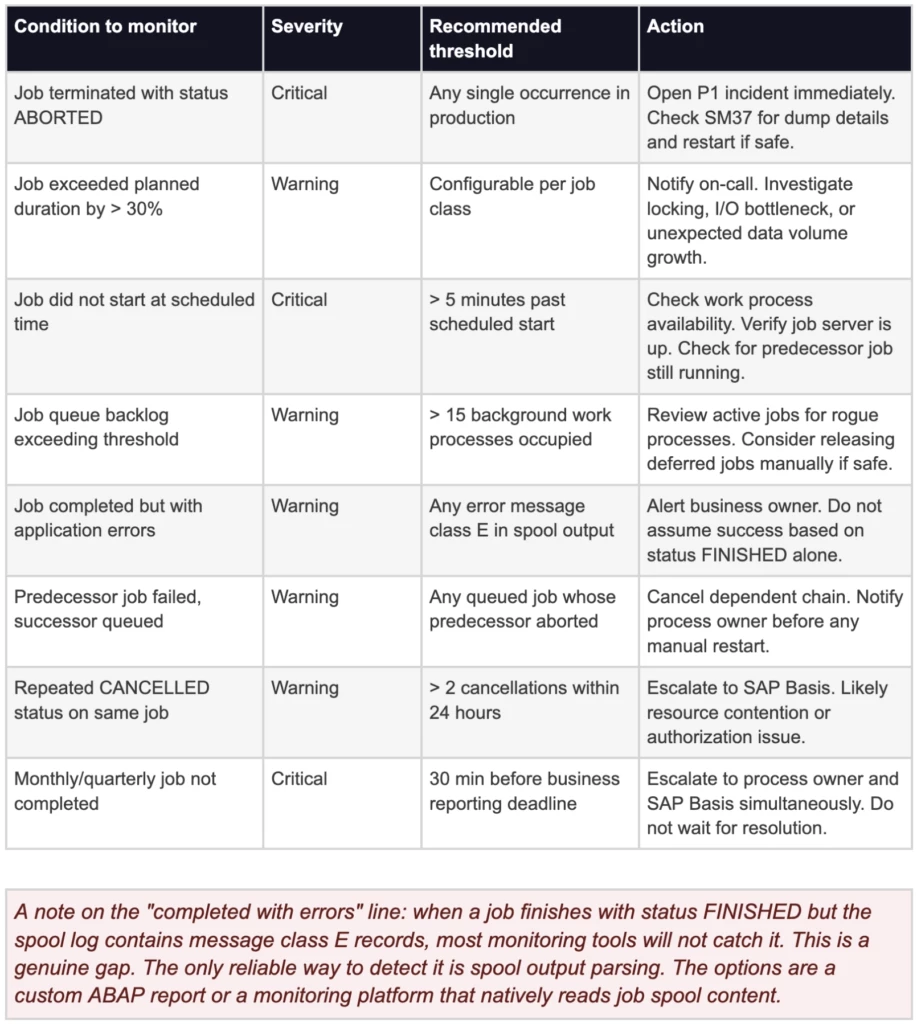
Background job alert reference : conditions, thresholds, and actions
The table below covers the main alert conditions worth configuring for SAP background job monitoring in a production environment. Thresholds should be adjusted to match the specific job profile of each environment. These are starting points, not universal standards.
Alerting patterns that work for SAP batch operations
Separate your alert audiences
SAP background job alerts go to the wrong people surprisingly often. A batch job failure at 03:00 lands in an SAP Basis inbox, where it waits until business hours. But the job in question is the payroll preprocessing run that finance needs completed before 07:00. The alert needed to go to finance operations on-call, not to the Basis team.
Structuring alert routing by job criticality and business owner is more work upfront than a single team-wide inbox, but it eliminates the category of incident where the right person heard about the problem four hours after they could have done something about it.
A workable approach: classify jobs into three tiers. Tier 1 covers business-critical jobs with hard deadlines: payroll, financial closing, legal reporting. These get immediate escalation to both the operations team and the business process owner. Tier 2 covers important but non-time-critical jobs: data archiving, performance optimization runs. These go to the operations team for next-business-hours review. Tier 3 covers housekeeping and low-priority batch. Logged, reviewed periodically, not actively alerted.
Time-aware alerting
The same job failure at 22:00 and at 06:30 warrants a different response. An overnight batch run that aborts at 22:00 has several hours before it affects business operations. The same failure at 06:30, one hour before users start their day, needs immediate action.
Configuring time windows into alert routing is a basic feature of most modern monitoring platforms, but it is underutilized. Setting higher urgency for jobs that fail within two hours of their business-visible output being needed, versus failures in the middle of the night, reduces unnecessary out-of-hours escalation while ensuring the time-sensitive failures get the response they require.
Avoid alerting on symptoms you cannot act on
One of the most common reasons SAP teams start ignoring batch job alerts is alert fatigue from conditions that fire constantly but are not actionable. A background work process saturation alert that fires every night during the same batch window, because the window was designed to run that many concurrent jobs, trains people to dismiss alerts.
Before adding an alert, the question worth asking is: if this fires at 03:00, what should the person receiving it actually do? If the answer is “nothing until morning” or “this is expected,” it should be a log entry, not an alert. Reserve alerts for conditions that require action within the urgency window the alert implies.
Dependency chain visibility
Individual job alerts do not tell you whether a job that just failed is isolated or the first domino in a chain of ten dependent processes. Monitoring systems that visualize job dependencies, showing which jobs are waiting on the failed one, what their deadlines are, and what the downstream business impact looks like. This context give the operations team the context to prioritize correctly.
Without that context, the default response to a job failure is to restart it and move on. With it, the team can see that the failed job is a predecessor for a financial closing run scheduled in 90 minutes, and adjust the priority of the incident accordingly.
Getting the setup right : practical recommendations
Start with a job inventory
Before configuring any monitoring, get a complete picture of what is actually scheduled in production. In most environments that have been running for more than a few years, there are jobs nobody fully owns, jobs that were created for a one-time task and never deleted, and jobs that duplicate functionality that has since been moved elsewhere.
A job inventory does not need to be exhaustive on day one. Start with jobs that have explicit business owners and hard completion windows. These are the jobs where a failure creates immediate business impact and where monitoring has the clearest ROI. Expand from there.
Build baselines before you build alerts
Running a monitoring tool against a SAP environment without baselines produces noisy, low-value alerts. The tool does not know what normal looks like, so it either fires on everything or fires on nothing, depending on how the thresholds were set.
Collect four to six weeks of job runtime data before finalizing alert thresholds. Make sure that data includes at least one month-end cycle, because batch job durations at month-end can be significantly higher than daily averages and those spikes should not trigger false alerts. Use the collected data to set duration thresholds per job, not a single global threshold across all jobs.
Test your alerts before you need them
Alert configurations that have never been tested have unknown reliability. Simulate a job failure in a non-production environment to verify that the right people receive the alert, that it contains the information they need to act on it, and that it routes to the correct incident management system with the right classification. This takes less than an hour and eliminates the unpleasant discovery that an alert configuration was wrong during an actual production incident.
Review job schedules after every major change
SAP system refreshes, major releases, transport imports that affect batch scheduling objects, and S/4HANA migrations all have the potential to disrupt job scheduling in ways that are not immediately visible. Building a post-change job schedule review into the change management process, verifying that critical jobs are present, scheduled correctly, and in released status. This step prevents a category of silent failures that otherwise show up only when a business user reports missing output.
What good background job monitoring actually looks like ?
A well-monitored SAP batch environment has a few characteristics that are worth using as a practical checklist.
The operations team knows about a job failure before the business does. That requires real-time monitoring with routing that reaches the right people during the relevant time window, not a log that gets reviewed the next morning.
Job duration anomalies are caught before deadlines are missed. That requires baselines and threshold configuration per job, not a single global alert that fires too late to be useful.
FINISHED status is not treated as evidence of correct execution. Critical jobs have a second validation layer: spool review, output verification, or downstream data checks. This layer that confirms the job did what it was supposed to do, not just that it ran to completion.
The schedule itself is monitored, not just individual job executions. Missing jobs and schedule drift get detected before they create business impact.
None of this requires a large team or a complex tooling stack. It requires intentional configuration, clear ownership, and the understanding that batch job monitoring is not a solved problem just because SM37 exists.
Redpeaks monitors SAP background jobs in real time across production and non-production landscapes, with duration baselines, spool-level alerting, and ITSM integration out of the box.